Private location history
Private Google Timeline alternative for Android route history
If you want to remember where you have been, but you do not want every trip tied to a cloud profile, GPS Logger gives you a deliberate model: start a route, save it on your phone, tap any tracked day for a timeline of stops and movements, and export it whenever you need.
Quick answer
GPS Logger is a private route-history app for Android. It is best when you want user-started GPS recordings, a day-by-day route timeline, a personal atlas, GPX/KML export and no account. It is not a silent always-on copy of every movement; you decide when recording starts and stops.
Why people look beyond automatic location history
Automatic location history can be convenient, but it often comes with trade-offs: cloud dependence, unclear export paths, missing trips, device migration risk, or a feeling that the record is not fully yours. For many people, the better answer is not recording everything. It is recording the routes that matter and keeping the files portable.
The Timeline-shaped part: Day Story
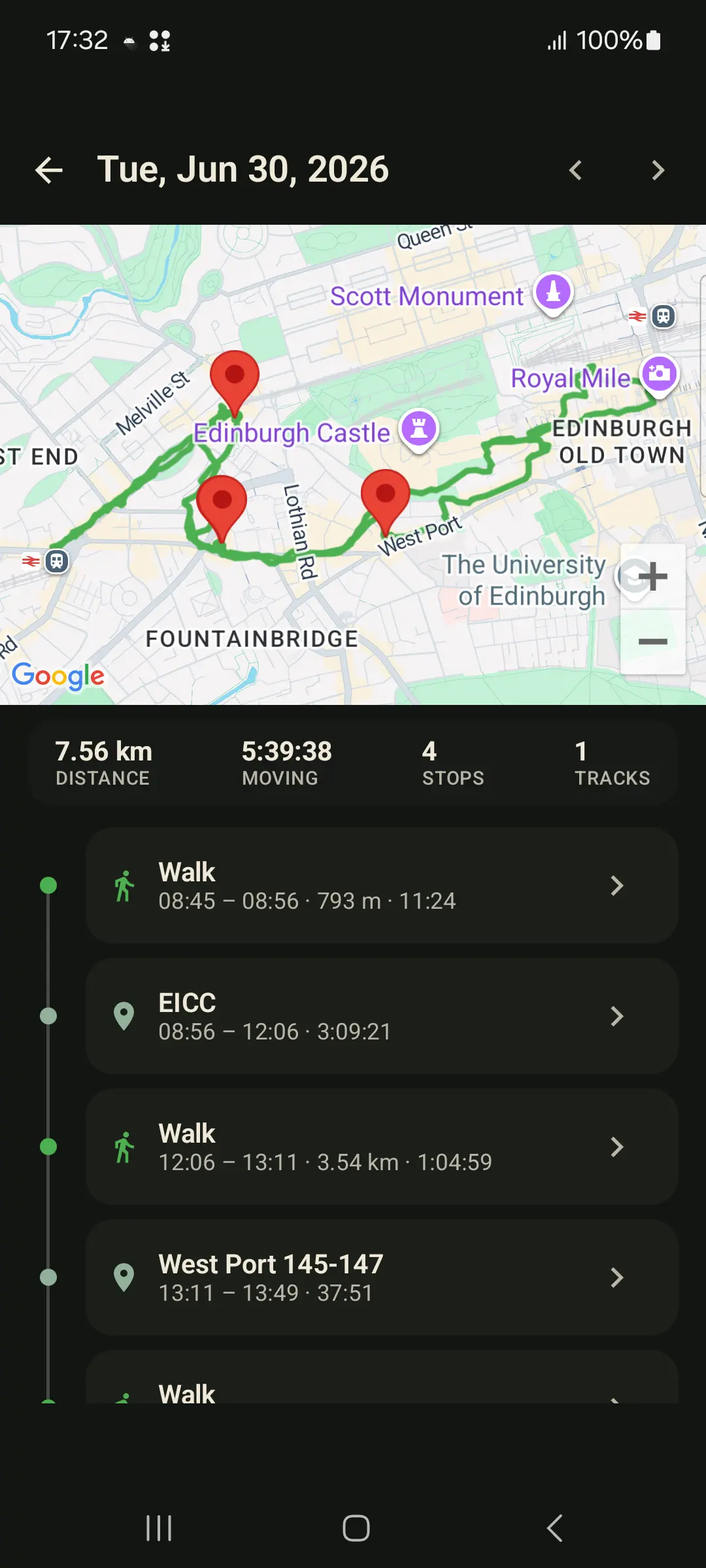
GPS Logger's Day Story screen is the daily memory view. Tap a recorded day in the calendar and the app builds a virtual timeline from your saved tracks: movements, stops, named places, moving distance, moving time and moments. It is a read model, so browsing a day does not split, rewrite or upload your tracks.
That makes it useful for travel days, hikes, field visits, city walks, commutes and everyday route memory: not just one line on a map, but the shape of the day.
What GPS Logger does differently
- You start the recording. Walks, hikes, rides, road trips, commutes and field visits become explicit saved tracks.
- History stays local by default. Saved routes live in the app database on your phone.
- Days become readable. Browse a map plus chronological stops, movements, named places and moments.
- The archive is visual. Browse a lifetime map, calendar, repeated places, countries and individual route stats.
- Data is portable. Export individual tracks as GPX or KML, or create a whole-history GPX ZIP backup.
- Live sharing is separate. When enabled, App Cloud shares current position only, not a server-side trail of saved trips.
When GPS Logger is a good fit
Use it if you want a private travel log, outdoor route journal, commute archive, road-trip memory, site-visit record or GPX collection that you can export. It is especially useful if your goal is remembering and owning route data rather than sharing workouts, feeding a cloud profile or building a public social identity.
When it is not the right fit
If you want a fully automatic timeline of every shop, train station, cafe and short movement with no manual start, GPS Logger is intentionally more controlled than that. Optional auto-start after reboot helps specific users who want persistent recording, but normal recording is still a visible action you control.
How to migrate old tracks
If you already have GPX files from another app or device, import them into GPS Logger and see them in one atlas. Bulk import accepts multiple GPX files or a ZIP backup, and the app shows any current import limits before you start.
What to search for if you miss Timeline
The useful terms are private Google Timeline alternative, Android location history app, daily route timeline, GPX recorder, and route history export. GPS Logger sits in that lane: a private route journal with export, not a navigation app or social fitness network.
Related guides
- How to record and export GPX tracks on Android
- How to import GPX files on Android
- Why offline GPS logging matters for privacy
- GPS Logger vs Strava and social fitness apps
- How to record a GPS track with the screen off on Android
FAQ
Does GPS Logger upload my route history?
Saved tracks stay on your device by default. Data leaves only when you choose a feature that needs it, such as export, App Cloud live sharing or self-hosted live upload.
Can I export everything?
Yes. You can export individual tracks as GPX or KML and create a full-history GPX ZIP backup.
What does the daily timeline show?
It can show a map, moving distance, moving time, stops, tracks, walks or rides, named places and saved moments for a tracked day.
Can I import old GPX files?
Yes. GPS Logger imports GPX files and ZIP archives, then adds the routes to your history, calendar, daily timelines and atlas.
Does it work without an account?
Yes. Recording, history, import and export do not require an account.